![airtouch-logo.png]](https://help.airtouch.net.au/hs-fs/hubfs/airtouch-logo.png?width=100&height=52&name=airtouch-logo.png)
What are Zones?
Zones allow you to divide your home into separate areas or rooms that can be individually controlled for heating and cooling. This gives you more flexibility, energy efficiency, and comfort by directing airflow only where it is needed.
Learn more about Zones:
- What Is a Spill Zone in AirTouch?
- Bypass Zone
- No Spill and Bypass
Adding or Creating New Zones
Important: New zones can only be created in AirTouch 5 (Installer Settings).
- Switch to AirTouch 5 on your console.
- Open the Quick Menu → Settings → Installer.
- Follow the on-screen steps to create or configure zones.
- Once configured, switch back to AirTouch Home, your new zones will appear automatically.
How Do I Rename My Zones in AirTouch Home?
Make AirTouch Home truly yours by giving each zone a unique, meaningful name. Whether you want to label zones by room type (e.g., Living Room, Master Bedroom) or by purpose (e.g., Kids’ Room, Home Office), renaming zones makes it easier to manage your comfort and simplifies control.
Why Rename Your Zones?
By default, zones may appear as Zone 1, Zone 2, etc. These generic names can make it harder to know which area you are controlling. Renaming zones lets you personalize your AirTouch Home experience, making it simple to identify and control each area right from the console or mobile app dashboard.
Step-by-Step Guide to Rename Zones
- Open the Zone Tile → Tap More
You can access the Zone Tile in several ways:
- Menu → Climate
- Dashboard: Tap the Zone Tile directly (if it has been added).
- AC Tile: Tap the Zone name within the AC tile.
- Room: If it has been assigned to a room. - Rename the Zone under Device Name field.
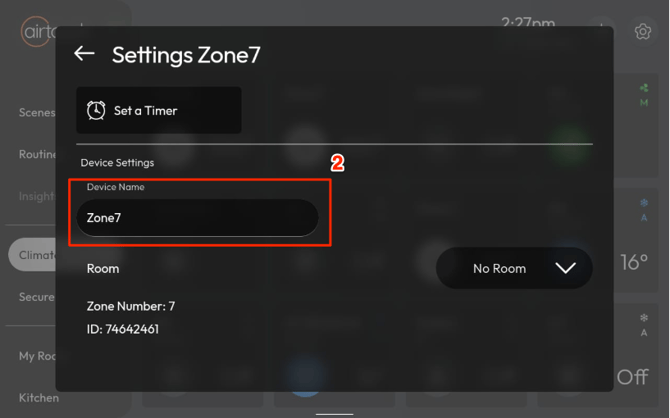
Note: Any changes made on the console will automatically sync with the AirTouch Home mobile app and vice versa.