![airtouch-logo.png]](https://help.airtouch.net.au/hs-fs/hubfs/airtouch-logo.png?width=100&height=52&name=airtouch-logo.png)
You can easily switch between the new AirTouch Home interface and the classic AirTouch 5 app on your console.
Switching from AirTouch Home to AirTouch 5
- On the AirTouch Home console, go to Settings → General.
- Tap Go to AirTouch 5 Classic App button.
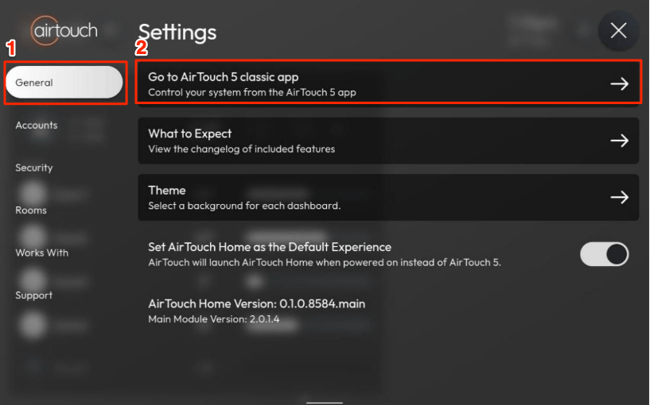
- The console will close AirTouch Home and display the AirTouch 5 interface.
- On the AirTouch 5 console, open the Quick Menu (top right corner).
- Tap the AirTouch Home icon.
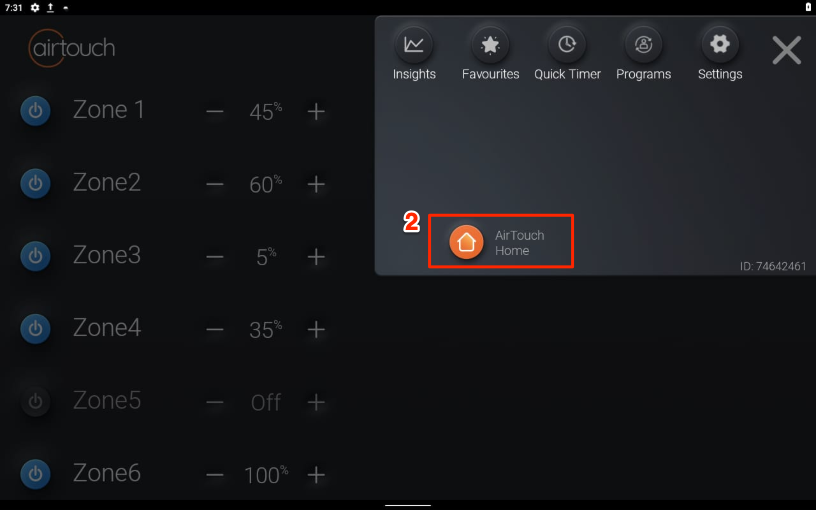
- The console will close AirTouch 5 and launch AirTouch Home.
Note: You can always manually switch apps by closing the current app and tapping the respective app icon (AirTouch Home or AirTouch 5) directly from the console’s app menu.