![airtouch-logo.png]](https://help.airtouch.net.au/hs-fs/hubfs/airtouch-logo.png?width=100&height=52&name=airtouch-logo.png)
When someone rings your AirTouch doorbell, your phone can now ring like an incoming call. You see live video from the doorbell on the call screen, so you know who's there before you pick up. It works on Android and iPhone, and from your lock screen.
Call-Style is on by default. If you'd rather get a normal notification, or no doorbell notification at all, you can change it in a few taps. The setting is yours alone: it's per phone and per location.
What is a Call-Style doorbell notification?
Call-Style means a ring at your doorbell comes through as a phone call instead of a small banner. Your phone rings, the screen fills with a live view from the doorbell, and you choose to answer or hang up. You get it whether your phone is locked, unlocked or in your pocket.
What are my doorbell notification options?
You have three choices, and you pick one for each location in AirTouch Home.
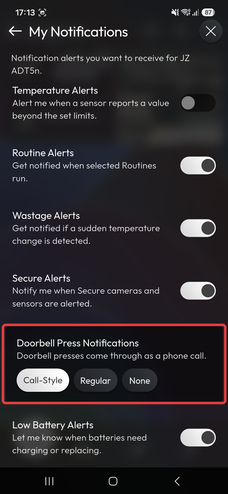
- Call-Style (default). When someone rings your doorbell, your phone rings like a call, full screen, with a live view from the doorbell. Answer or hang up.
- Regular. A standard push notification each time someone rings your doorbell.
- None. No doorbell notifications for this location.
How do I change what happens when someone rings my doorbell?
It takes four taps in the AirTouch Home app on your phone.
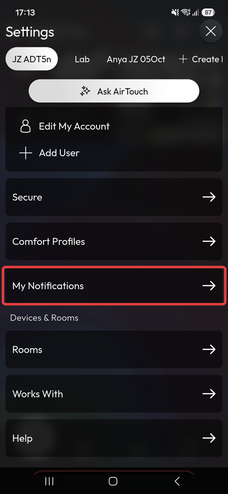
- Open AirTouch Home and tap Settings.
- Pick the location at the top of the screen. If you have more than one home in AirTouch Home, choose the one you want to change.
- Tap My Notifications.
- Under Doorbell Press Notifications, tap Call-Style, Regular or None.
What happens on an Android phone when someone rings the doorbell?
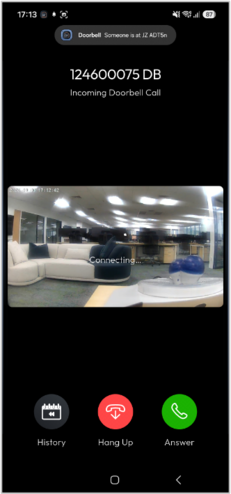
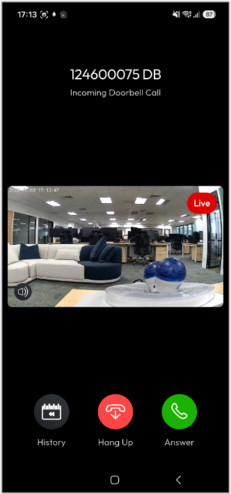
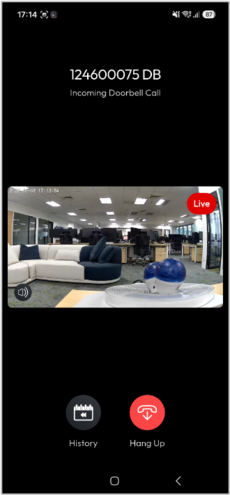
On Android, a ring at your doorbell opens a full-screen call with a live view, and you tap Answer or Hang Up.
- Someone rings your doorbell. A full-screen call opens on your phone.
- The live view from the doorbell connects. Tap Answer to talk, or Hang Up to dismiss it.
- Once you answer, the live view keeps going so you can see and speak to your visitor.
What happens on an iPhone when someone rings the doorbell?
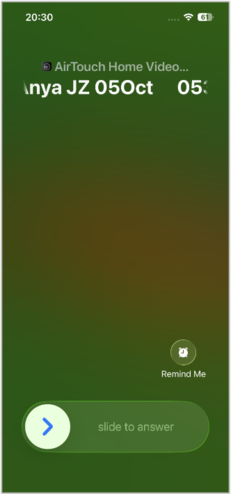
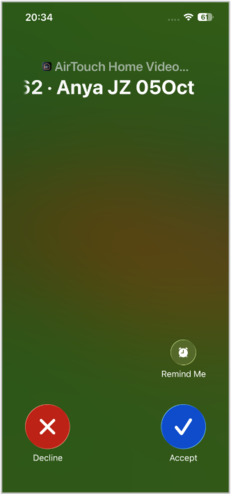
On iPhone, a ring at your doorbell shows as a normal incoming call. Slide to answer on the lock screen, or tap Accept when your phone is unlocked.
-
- If your phone is locked, the doorbell call shows on the lock screen. Slide to answer.
- If your phone is unlocked, you see the usual iPhone call screen. Tap Accept or Decline.
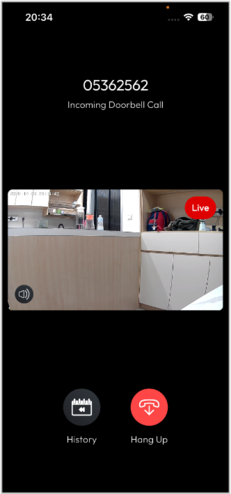
- When you accept, AirTouch Home opens the live doorbell view.
How do I turn off doorbell calls?
Choose Regular or None instead of Call-Style. Go to Settings > My Notifications in AirTouch Home, pick the location, and tap Regular to get a standard notification, or None to get no doorbell notification for that location.
Does this setting change it for everyone in my home?
No. Each person sets it on their own phone. If you switch to Regular, your partner's phone still rings Call-Style until they change theirs.
Why isn't my doorbell ringing my phone as a call?
Nearly always, it's the setting on your phone or your phone's own notification rules. Check these in order.
- In AirTouch Home, go to Settings > My Notifications. Make sure the right location is selected at the top and Call-Style is chosen.
- Check your phone allows notifications from AirTouch Home, and that Do Not Disturb or a Focus mode isn't blocking it.
- Make sure AirTouch Home is up to date on your phone.
- Still stuck? Contact Team AirMate on 1300 980 656 or via our contact form.
Good to know
-
- The setting is per location. If you look after more than one home in AirTouch Home, set it for each one.
- On iPhone, you can tap Remind Me on the call screen, the same as any other call.
- Your phone's own settings still apply. If Do Not Disturb or a Focus mode is on, or AirTouch Home isn't allowed to send notifications, the call won't ring through.
If you need further assistance please reach out to Team AirMate via the contact form.