![airtouch-logo.png]](https://help.airtouch.net.au/hs-fs/hubfs/airtouch-logo.png?width=100&height=52&name=airtouch-logo.png)
AirTouch Home works with Sonos. Connect your Sonos account once and your speakers appear in AirTouch Home, next to your air conditioning, lights and security. Play, pause, change the volume and pick a playlist without opening another app.
What do I need to connect Sonos to AirTouch?
- Your Sonos speakers are set up and working in the Sonos app. The Sonos app creates your Sonos account during setup, and that's the account AirTouch Home links to.
- You know your Sonos account email and password.
- AirTouch Home is updated to version 1.2.0 or later. This applies to both your console and the mobile app.
- One Sonos account can be linked to each AirTouch Home Location.
How do I connect my Sonos account?
- Open AirTouch Home. On the home screen, or under Works With, tap Add a new device.
- Choose Sonos.
- Tap Sign in.
- AirTouch Home opens the Sonos sign-in page. Enter your Sonos email and password, then tap Sign In.
- Sonos asks you to allow the connection between AirTouch Home and Sonos. Tap Allow.
- You're sent back to AirTouch Home. Your speakers appear with the names you gave them in the Sonos app.
- Assign each speaker to a room. We recommend it, but you can skip it and do it later.
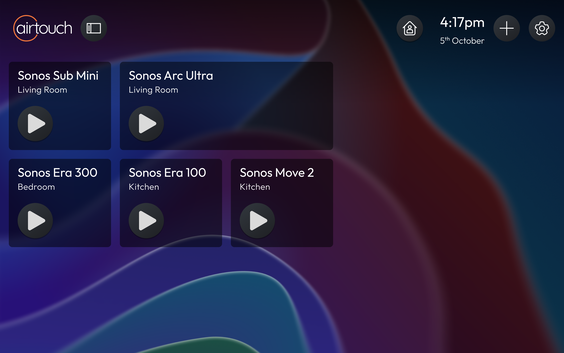
Your Sonos speakers are now connected. Each one gets its own tile on your dashboard.
How do I play music from AirTouch Home?
- Tap a speaker tile to open it. You'll see play, pause and volume.
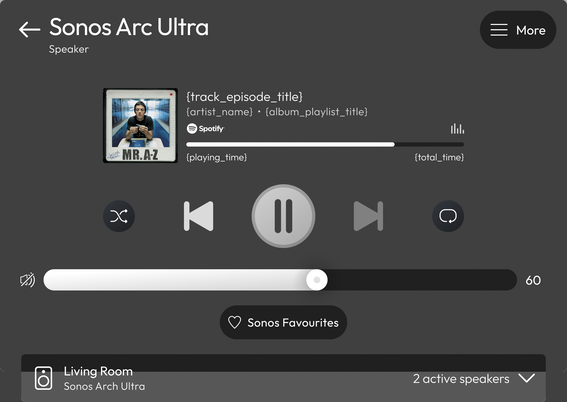
- Tapping the tile will open the full view for more controls. The controls change to suit what's playing. A radio station has no previous or next, for example.
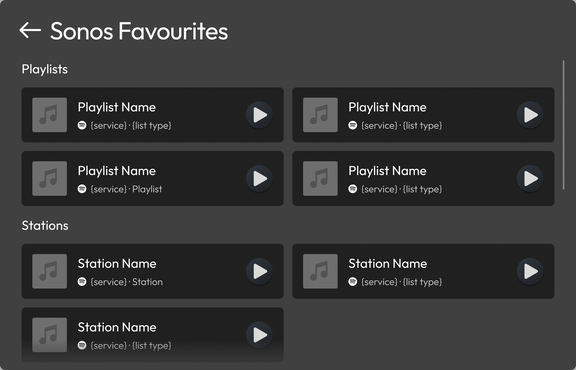
- Any playlists or radio stations you've liked in the Sonos app appear in AirTouch Home. To add a new one, save it as a favourite in the Sonos app first.
-
Tap More for speaker settings. From there you can rename the speaker, move it to a different room, or see its technical details.
How do I add a new Sonos speaker to AirTouch Home?
New speakers you set up in the Sonos app don't appear in AirTouch Home by themselves. To bring them across, go to Settings > Works With > Sonos and tap Sync Devices.
Can I play music in more than one room?
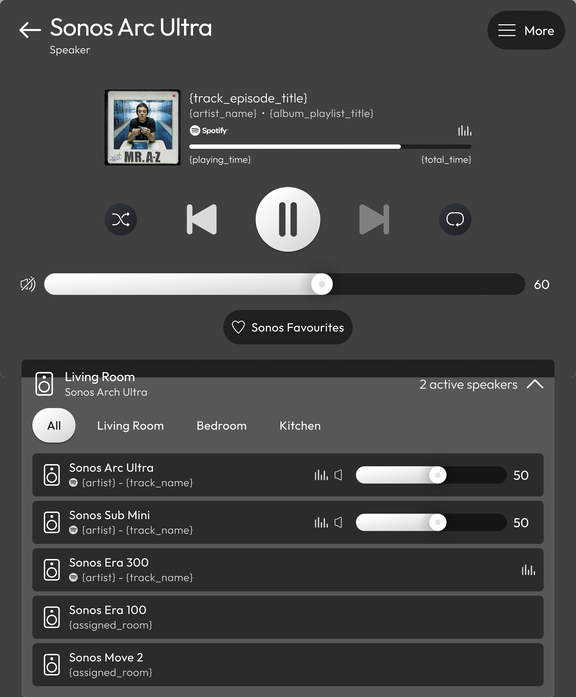
Grouping speakers happens in the Sonos app. In AirTouch Home, each speaker keeps its own tile. To see which speakers are grouped together, open a speaker's tile and scroll down.
Why won't my Sonos speaker play in AirTouch Home?
- Check it plays from the Sonos app first. If it doesn't play there, it won't play from AirTouch Home.
- Check you linked the right Sonos account. Households with two Sonos accounts hit this one. Only one account can be linked to a Location.
- In the mobile app, pull down on the dashboard to refresh.
- Still stuck? Contact Team AirMate on 1300 980 656 or via our contact form.
Good to know
- AirTouch Home controls your Sonos speakers. It doesn't replace the Sonos app. Adding speakers, changing Wi-Fi and signing in to music services still happen in Sonos.
- You can add a Sonos speaker to a Scene or Routine. The actions available are Play, Pause, Play Favourite and Volume.